If APIs are part of your product they should be part of your Quality Assessment process.
An API that:
- throws HTTP 500 exceptions for every invocation
- contains multiple overlapping resource paths
- has no defined endpoint methods
should fail your QA process.
And an API without any documentation should really fail your QA too, it won't do you any favours in the long run... or the medium run... maybe the short run if you're lucky and its small and you're writing both ends of it. And an API that has published documentation that doesn't match what you've got running in production... well that's really not going to do you any favours, regardless what kind of run it is.
I've been on both the deploying and working with APIs without a spec for long enough that I know its not sustainable, it just leads to assumptions being made, undocumented workarounds, and then breaking changes with no notifications, its painful and its messy, and we can do better.
So I'd like to talk about a new word for our vocabulary as IT professionals "publishing". There's already too many terms floating around in this area, so I'll stick with the existing term CI/CD (Continuous Integration & Continuous Deployment). But I'll add some acceptance criteria into that:
- when you deploy a new version of your API, ship its documentation with it as well
- when you update your API, update its documentation to match, and ship those updates too
Just... keep them both together, its the same reason IKEA ships its build instructions with its cabinets... because they're trying to help their customers build things for themselves and only to come back when they want to spend more money (not return what they broke when it didn't work).
Why we're bad at documentation
Hands up those developers who write user manuals! Probably tiny companies in the main. Keep them up if you like doing it!
"Developers are expensive, we want them building stuff, they work on complex things, they don't know what the real world is like, we need people to buffer our technical people from our customers, we'll get non-technical staff to write documentation".
Ok, that's an approach, a whole cottage industry in some cases... then we get to here's an API to document.
"But... but our non technical people don't write those kind of documents, they like using Word... so we'll do a Word document and you give us what you need to keep the techy people happy".
Ok... this is one I've actually heard quite a bit, and it throws me, its like the argument of "We'll make cheap dog food and then we'll put cartoons on the side of the can so that it looks friendlier" and there's a bit of logic to that that I buy into. You're not selling it to the dog, you're selling it to the human that buys it... but if its bad dog food and the dog doesn't eat it... well you've made one sale and your repeat customer goes somewhere else. How about making sure that you're willing to eat your own dog food?
Oh... look how I worked that in there...
In the same way, if your non-technical staff aren't ready to write API specifications, then lets find a way to make it easier (and not just because I find Word really bad at this, I find that anything that moves away from A Single Source of Truth to be the start of problems).
But you should also remember, that APIs by definition are intended to be read by a technical audience, sometimes just keep your non-technical staff out of it and write the documentation that you would want to use (just make sure someone else reads it first, its too easy to make assumptions because you know how it works). That's not to say there isn't a line in the middle for collaborating on documentation, there always is.
An API First Approach
There's quite a different approach though. One that doesn't recognise an API as an afterthought, it boils down to the philosophy that an API is a contract, a technical one, and a procedural one if documented appropriately.
That approach is API First Development, conceptually it means you define the API first with both sides who want to utilise it. That means you need an unambiguous language to express the endpoints. As I do most of my APIs points as RESTful endpoints rather than GraphQL, or SOAP (now that I've escaped that life), that gives me OpenAPI Specification, which you might have heard of as Swagger.
Utilising the OpenAPI spec doesn't necessitate doing API first development, there's nothing stopping you writing the code first and generating the spec from that, but it starts to change the dynamic of working with both parties working on a shared API contract, and it starts to weed out implementation issues from the discussion.
Personally I think there's a better way, and that's to start with the contract first, and then treat both ends as independent systems. There's a much more eloquent article from James Navin at Atlassian about why you want to take this approach. I really like the concept of doing changes to the API spec as Pull Requests, that's neat... and it gives us an ongoing way to maintain the API after we've deployed its first version.
Keeping our documentation in sync on AWS
Ok, that's a lot of theory and aspiration, how do we make it work in practice? So my baseline starting point:
- Define my API Endpoint First
- OpenAPI Specification
- (I'll use YAML to do this)
- Publish the drafts in a version controlled manner and take feedback
- Git is my solution
- (despite all my earlier notes, my APIs are private so I'll use BitBucket, feel free to use your own Git provider of choice)
- Push out changes to the APIs to an API Gateway to host the changes
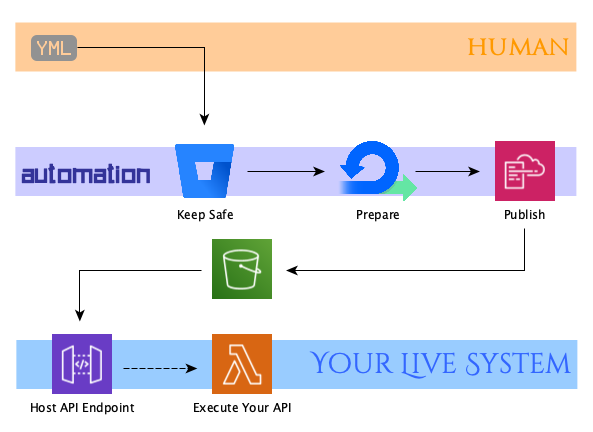
But... we didn't do the documentation and that was our acceptance criteria!
I know, I'm glad you're making sure I address that point.
Well first that means we need to accept that we need to start thinking about our systems as more than just the deployed artifacts we produce, its the help documentation for our users, its the support system when that goes wrong. In short we think about the Customer Experience, so people who use our APIs are our customers too, lets call that consideration Developer Experience and its the documentation for how to use it (as well as making sure that we make APIs that people want to use, as its people that write APIs after all).
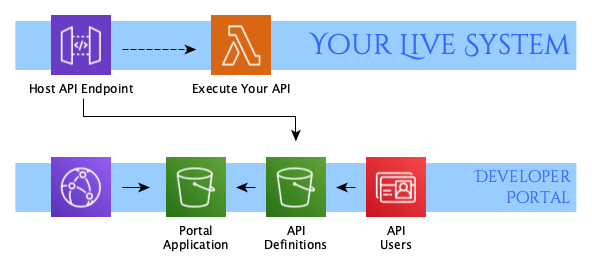
- Make sure that its documentation gets shipped with it
The AWS Serverless Developer Portal is a project hosted in AWS' awslabs GitHub account, it aims to provide a documentation, user management and testbed for your APIs in one small no cost product.
Setting up the Portal
For the purposes of keeping this post focused on a single problem, I'm going to leave out the issues with keeping your API Gateway in sync with your application that sits behind it, that's another whole barrel of fun for another time, today we're focused on getting the API Gateway in sync with its documentation.
There's two deployment options for the Serverless Developer Portal:
I was all set for just clicking a few buttons in a SAR deployment and getting a portal up and running. Sadly it didn't work out that way, while it was reasonably easy to get to a CloudFormation page with a set of parameters to complete, I had at least 7 different goes at deploying it with different failures each time until I managed to get a handle on the fact that it was appending the value I was entering as one of the parameters was being concatenated to form Lambda names at different stages of the deployment. (And because there is a character limit, anything over 10 characters of my own as an identifier would cause the lambda to fail to create).
I eventually gave up on this approach as I was having to dig through the CloudFormation script anyway I thought it was best to work with one I could see (and contribute suggestions to), so I've gone with the SAM model and picked up the repo from AWS' Git Hub
This does rely on having the AWS CLI and SAM installed on your development machine, and credentials to an AWS Account which allows you to provision the resources required. There's no resources I've come across so far that have any ongoing costs for small user cases so its fine to experiment with and leave running.
Since SAM will orchestrate using CloudFormation, this requires us to push the assets for the Serverless Developer Portal into an S3 bucket that CloudFormation can pull from. Once that's done, we can then execute SAM command and run our CloudFormation script:
- $stack_name
- Name of cloudformation stack that will be deployed
- I ended up using "dev-portal" for this after my problems with the SAR deployment
- $cloudformation_repo_bucket
- Name of the S3 bucket we have stored our configuration of the Severless Developer Portal in
- $portal_site_bucket
- Name of the S3 bucket we will create to store the assets of the portal
- $artifact_bucket
- Name of the S3 bucket we will create to store our OpenAPI specification files
- $cognito_url
- This string is used with the Amazon Cognito hosted UI for user sign-up and sign-in
sam deploy --template-file ./cloudformation/packaged.yaml \
    --stack-name $stack_name \
    --s3-bucket $cloudformation_repo_bucket \
    --capabilities CAPABILITY_NAMED_IAM \
    --parameter-overrides \
    DevPortalSiteS3BucketName=$portal_site_bucket \
    ArtifactsS3BucketName=$artifact_bucket \
    CognitoDomainNameOrPrefix=$cognito_url
Registering Users
Now one of the most puzzling things about this portal for me is the fact that it allows self-registration and subscription of end users totally out of the box without any verification of that user or acceptance of terms/conditions. To be clear, the portal doesn't preclude setting up a registration system that requires approval/authorisation, but it requires the development of your own custom lambda functions to create this kind of workflow and you can disable the self-sign up option and directly invite users instead.
However that leaves you with the problem of how you create the admin user if you elect to disable the self-sign up process. This is because it asks you to sign up as a normal user then manually adjust the Cognito groups to include this user as an admin. I thought it should just manually be a process of registering a user account in Cognito directly and setting up the user groups, but this didn't appear to let me access the portal.
Its not directly relevant to this section and will give me the basis of a later extension, so I'll leave that as self sign up and return later for a better workflow.
Publishing with the Portal
We have our developer portal set-up and registered an admin account with which we can configure the portal and administrate users. Now we need to actually get something into it:
Manually publishing files that use API Gateway
One of the nicest things about the AWS Serverless Developer Portal is the fact that if you deploy any API Gateway into a stage in the same AWS Account, it will refresh the view in the Portal automatically as the portal is built to query the Account as part of rendering the page.
In fact you might find if you've already got some API Gateways published that these will already be visible in your Admin Portal section.
Now you have to make sure that these are activated in the Admin page of the portal before they're visible to your customers, otherwise they'll remain hidden from view.
This means that if you publish your OpenAPI file using the import-rest-api cli, that's all that you have to to get it to into the portal.
However:
Serverless Developer Portal will pull in definitions from APIs which are deployed to a stage and are mapped with integrations to endpoints. It is not possible to deploy a gateway if a method is missing its integration mapping.
This means that any demonstration of API Gateway integration that I could speak about here would be entirely subjective to what your application requirements and architecture is. I'd rather not spend this entire post talking about that as it's quite a lengthy subject, but for my purposes here, I have manually crafted the OpenAPI gateway extensions into my YAML file and deployed this to connect to a set of python based Lambdas running in the account as a proxy pass through.
This really is the most subjective part of this deployment and will be unique to your own solution, this is one area where having your own documentation will need to pay off
Manually publishing files that aren't deployed in API Gateway
Ok now that we've done it for API's that we've got deployed through API gateway, what happens if we're not ready to activate them yet or never intend to use API Gateway at all? Well, thankfully the portal actually has that problem solved for us. Remember how it created two S3 buckets for us earlier on:
- portal_site_bucket
- Stores the static assets associated with the portal
- artifact_bucket
- Stores the specification files we want to publish through the portal
Well artifact_bucket is actually the answer for us thankfully, its as simple as dropping an OpenAPI file into that S3 bucket in the following path: /catalog
Any new OpenAPI file you add to that path triggers an S3 event that publishes that specification to the portal automatically via a lambda function. Ok so we're done there... I'm a little disappointed, after so much fiddling to get this far I had expected that part to be harder.
What is worth noting here though, is that anything you drop into this folder will be considered "published" and appear directly for your portal customers. It doesn't seem possible to to export this OpenAPI spec from here or generate a client SDK from it though. I'm hoping that's just an oversight of mine that I'll look to revisit.
Defining Usage Plans
One of the key considerations you'll need to build into your API Strategy is how to protect your APIs from abuse, or how you intend to monetise them. The AWS API Usage Plans is really beyond the scope of this discussion but does need to be setup to allow your API customers to be able to subscribe to them. Believe me, its worth getting these in place with sensible rates even if you don't have any unauthenticated endpoints.
Once you've got a usage plan setup, this lets you associate API keys with them, when your customers call your API, by passing the API Key and their user ids you'll be in a position to start tracking usage of your solutions.
Automating it
Ok, we've got more of the pieces in place now, so I'd like to fully automate this deployment now like I'd promised when I started the blog publishing workflow.
Automatically publishing files that aren't deployed in API Gateway
In fact, the easiest part is deploying the static API files which don't involve API gateway, that's just exactly the same workflow as I had before:
- Create Source Repository with file content (OpenAPI file in this case)
- Pull request of this to master branch
- Pipeline to push this to S3 on approval
In fact there's so little difference here, if you review the blog publishing workflow you'll find it pretty much exactly boils down to this:
image: atlassian/default-image:2

pipelines:
   branches:
    master:
      - step:
          name: Deploy to S3
          deployment: production
          script:
           - pipe: atlassian/aws-s3-deploy:0.3.8
             variables:
               AWS_ACCESS_KEY_ID: $AWS_ACCESS_KEY_ID
               AWS_SECRET_ACCESS_KEY: $AWS_SECRET_ACCESS_KEY
               AWS_DEFAULT_REGION: $AWS_REGION
               S3_BUCKET: $S3_TARGET_BUCKET
               LOCAL_PATH: $PATH_TO_OPENAPI_FILE
ACL: 'private'- $S3_TARGET_BUCKET
- This will map to our artifact_bucket from earlier
- $PATH_TO_OPENAPI_FILE
- This is really down to your own repository structure, I'm keeping mine very simple and just leaving it at the root for now
Automatically publishing files to API Gateway
As I said earlier, this is a whole bigger ecosystem here than just about publishing the OpenAPI files straight into API Gateway. The reason for that is that you need to deploy your API Gateway to a stage and define its integration points (which also means that you'll need to deploy your application and infrastructure behind it).
That will require quite a knowledge of your own deployment processes and architectures, so I don't want to dilute this post with a single implementation here, but if you have a process defined to deploy your application, as long as you have annotated your OpenAPI file with AWS' API Gateway Extensions and the API Gateway successfully deploys to a stage, that's all you need to do here. As we saw earlier that items deployed to an API Gateway in the same account will register with the portal.
If you're interested, I trigger a deploy to API Gateway as part of a workflow using AWS CLI Pipeline for now as I built this using CloudFormation while I studied for my AWS SysOps Associate, but I'm going to be switching this over to SAM deployments in the near future.

And hopefully now what we have is honestly a "self documenting" code approach for 3rd parties to use (and from that hopefully ourselves too).
Well... it's only truly self-documenting if we populate the specification files sufficiently and keep on top of that. Watch this space... that's coming next.